Dual Camera on iPhone 17: How Dual Capture Works and How to Do It on Older iPhones
Short answer: Dual Capture, Apple's built-in way to record the front and back camera at the same time, only works on iPhone 17, iPhone 17 Pro, iPhone 17 Pro Max and iPhone Air. If you have an iPhone 16, 15, 14, 13 or any model back to iPhone XS, you can still record dual camera video with an app like Double Camera, and you get more layout options than the built-in mode.
What Is Dual Capture on iPhone 17?
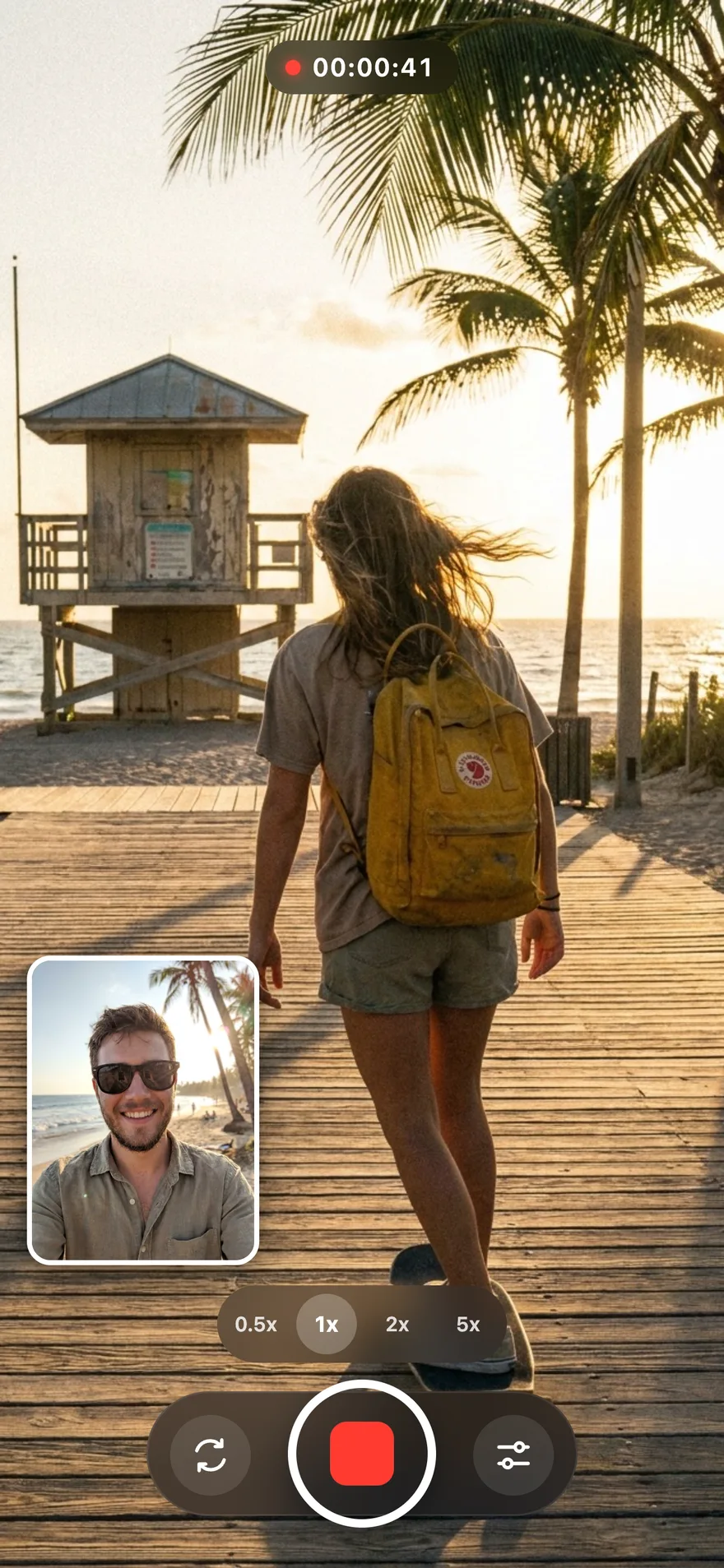
Dual Capture is a video mode in the iPhone Camera app that records the rear camera and the front (selfie) camera at the same time. The rear camera fills the frame and the front camera appears as a small picture in picture window in a corner, so viewers see the scene and your reaction in one clip. The result is a single video file saved to Photos, with both views already combined.
Apple introduced Dual Capture with the iPhone 17 lineup and iOS 26. With iOS 27 the same feature also arrived in FaceTime on those models, so you can share yourself and what you are looking at during a call. People on the other end can see your dual camera feed as long as their device runs iOS 27, but only iPhone 17 models and iPhone Air can send it.
Before Dual Capture, recording front and back cameras simultaneously on iPhone always required a third-party app. That is still true for every iPhone released before the iPhone 17.
Which iPhones Support Dual Camera Recording?
Two things decide whether your iPhone can record both cameras at once: Apple's built-in Dual Capture mode, which is limited to the newest models, and the multi-camera support in iOS that apps use, which goes back to iPhone XS and iPhone XR.
| iPhone model | Built-in Dual Capture | Double Camera app |
|---|---|---|
| iPhone 17, iPhone 17 Pro, iPhone 17 Pro Max, iPhone Air | Yes | Yes |
| iPhone 16, 16 Plus, 16 Pro, 16 Pro Max | No | Yes |
| iPhone 15, 15 Plus, 15 Pro, 15 Pro Max | No | Yes |
| iPhone 14, 14 Plus, 14 Pro, 14 Pro Max | No | Yes |
| iPhone 13, 13 mini, 13 Pro, 13 Pro Max | No | Yes |
| iPhone 12 and iPhone 11 models | No | Yes |
| iPhone XS, XS Max, XR | No | Yes |
| iPhone X and older | No | No |
Apple has not said whether Dual Capture will come to older iPhones. Because the hardware in older models already supports recording two cameras at once, apps fill that gap today.
How to Use Dual Capture on iPhone 17
If you own an iPhone 17 model or iPhone Air, the built-in mode is quick to turn on:
- Open the Camera app and swipe to Video.
- Open the camera controls in the viewfinder and turn on Dual Capture. A small window with the front camera appears.
- Drag the front camera window to the corner where it covers the least important part of the shot.
- Press the shutter button, a volume button or Camera Control to start recording.
- Stop recording. The combined video is saved to Photos like any other clip.
Dual Capture records one merged video, so the front and back views cannot be separated or rearranged afterwards. If you want split screen, a bigger selfie window or a different look, record with a dual camera app instead.
How to Do Dual Camera on iPhone 16, 15, 14 and 13
On models without Dual Capture, Double Camera gives you the same result: one synchronized video with both cameras. The steps are the same on every supported iPhone:
- Download Double Camera from the App Store and open it.
- Allow access to the camera and microphone, and to Photos so videos save automatically.
- Choose a layout: picture in picture (PiP) or split screen, side by side or top and bottom.
- Resize and drag the PiP window, and set a border color, width and corner radius if you want one.
- Tap record. Both cameras start together and stay in sync.
- Stop recording and share the finished video to TikTok, Instagram, YouTube or Messages.
iPhone 16 and iPhone 16 Pro
iPhone 16 models do not have Dual Capture, but they record front and back camera video at high quality with Double Camera. For lighting, framing and layout tips specific to this model, read how to record double camera video on iPhone 16.
iPhone 15 and iPhone 15 Pro
iPhone 15 is the most searched model for dual camera recording. Our step-by-step guide covers setup and the best settings: how to use Double Camera on iPhone 15.
iPhone 14
On iPhone 14, picture in picture works well for reactions and split screen suits tutorials. See how to record dual camera video on iPhone 14 and the iPhone 14 split camera guide.
iPhone 13 and older
iPhone 13, 12, 11, XS and XR can all record both cameras at once with Double Camera. Keep the phone cool and close other apps during long recordings. More tips: recording double camera video on iPhone 13.
Dual Capture vs Double Camera: Which Should You Use?
If you have an iPhone 17 and only need a quick selfie window in the corner, the built-in mode is enough. If you want more control over the layout or you use an older iPhone, Double Camera is the better fit. Coming from another app? See how Double Camera compares in our MixCam alternative guide.
| Built-in Dual Capture | Double Camera | |
|---|---|---|
| Supported iPhones | iPhone 17, 17 Pro, 17 Pro Max, iPhone Air | iPhone XS, XR and newer (iOS 13+) |
| Layouts | Picture in picture | Picture in picture, split screen side by side or top and bottom |
| Selfie window | Small window you can move to a corner | Resize it and drag it anywhere in the frame |
| Borders and styling | Limited | Border color, width and corner radius |
| Output | One combined video | One combined, synchronized video |
| Where it works | Camera app and FaceTime | Double Camera app |
| Price | Built in | Free download on the App Store |
Tips for Better Dual Camera Videos
- Light your face. The front camera has a smaller sensor than the main camera, so face a window or a soft light, especially indoors.
- Plan where the selfie window goes. Keep it away from faces, text and the subject of the rear camera. For vertical videos, a top corner usually works best because captions sit at the bottom.
- Use split screen for tutorials. When both views matter equally, such as cooking, crafts or product demos, split screen gives each camera the same space.
- Hold the phone steady. A small tripod or grip keeps the rear view stable while you talk to the front camera.
- Check storage and battery. Recording two cameras uses more power and space than a normal video. Clear space before long sessions.
- Think about audio. The microphone is closest to you, so speak clearly and avoid windy spots, or use a wired or Bluetooth mic.
Why Don't I See Dual Capture on My iPhone?
If the Dual Capture option is missing, check these points:
- Your model: Dual Capture only appears on iPhone 17, 17 Pro, 17 Pro Max and iPhone Air. iPhone 16 Pro and older models do not have it, even on the latest iOS.
- The camera mode: Dual Capture is part of Video mode. Switch away from Photo, Portrait or other modes.
- Software: Update to the latest version of iOS in Settings > General > Software Update.
If your iPhone does not support Dual Capture, install Double Camera to record front and back camera video on iPhone XS and newer.
Frequently Asked Questions
Does iPhone 16 have Dual Capture?
No. Apple's built-in Dual Capture mode is only available on iPhone 17, iPhone 17 Pro, iPhone 17 Pro Max and iPhone Air. On iPhone 16 and older models you can still record the front and back camera at the same time with a dual camera app such as Double Camera.
Will Apple bring Dual Capture to older iPhones?
Apple has not announced Dual Capture for older iPhones. iOS 27 added Dual Capture to FaceTime, but only on iPhone 17, iPhone 17 Pro, iPhone 17 Pro Max and iPhone Air.
How do I do dual camera on iPhone 15?
Install Double Camera from the App Store, allow camera and microphone access, choose picture in picture or split screen, and tap record. Both cameras record into one synchronized video that is saved to your Photos library.
Is Dual Capture the same as dual camera?
They describe the same idea: recording the front and back cameras at the same time into one video. Dual Capture is Apple's name for the built-in mode on iPhone 17 models. Dual camera or double camera usually refers to apps that do the same on more iPhones.
Which iPhones can record front and back camera at the same time?
With the built-in Camera app, only iPhone 17, iPhone 17 Pro, iPhone 17 Pro Max and iPhone Air. With Double Camera, iPhone XS, iPhone XR and every newer iPhone running iOS 13 or later.
Can I change the Dual Capture layout?
Built-in Dual Capture records the front camera as a small picture in picture window over the rear camera. Double Camera adds split screen layouts, a resizable PiP window you can drag anywhere, and custom borders.
Record Dual Camera Video on Any Recent iPhone
Whether you have an iPhone 17 or an iPhone XS, Double Camera records the front and back cameras together with picture in picture, split screen and custom borders. Download it free from the App Store.

Explore related pages:
